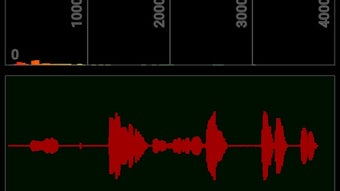

Download mr spectra APK – FFT-Based Audio Spectrum Analyzer, Audio Visualization, Sound Wave Scope, Spectrogram, Musical Mood Light
Overview
mr spectra is an FFT-based audio spectrum analyzer designed for real-time audio visualization and analysis. The software enables users to examine audio signals across frequency and amplitude dimensions, offering detailed insights into sound characteristics. It is particularly useful for professionals and enthusiasts working with audio engineering, acoustics, music production, or sound monitoring. By leveraging Fast Fourier Transform (FFT) technology, mr spectra converts incoming audio into visual representations that reveal spectral content with high precision. The tool supports multiple weighting filters—A-weighting for human hearing sensitivity, C-weighting for industrial or mechanical sounds, and Z-weighting for flat, unfiltered responses—making it adaptable to diverse audio environments.
Real-world applications include live sound monitoring, audio quality assessment, music visualization, and ambient mood lighting. The software can serve as a musical mood light by syncing visual output with audio input, creating immersive experiences in home studios, performance spaces, or personal entertainment setups. The developer did not provide additional details about the development team or organizational background. The application is available as an APK, indicating it is intended for Android devices. Users can expect a dedicated audio analysis experience tailored to mobile platforms with real-time responsiveness.
Key Features & Capabilities
- FFT-Based Real-Time Analysis – Utilizes Fast Fourier Transform to break down audio signals into frequency components, enabling precise spectral visualization.
- Multiple Weighting Filters – Includes A-weighting (for human hearing), C-weighting (for loud machine sounds), and Z-weighting (flat response) for accurate audio perception modeling.
- Customizable Visual Displays – Users can choose between decibel scope, wave scope, and spectrogram views to match their analysis needs.
- Interactive Zoom Controls – Swipe gestures allow intuitive zooming in and out on both frequency and amplitude scales for detailed inspection.
- Display Customization – Options to show or hide axes, dB values, Max dB indicators, and adjust color schemes for personal preference or better visibility.
- Graph Style Selection – Supports solid bars or line graphs for visual representation, enhancing clarity based on user preference.
- Landscape Mode Support – Enables mirroring on TVs or external displays, ideal for presentations or ambient lighting setups.
- Decibel Calibration – Allows users to set a base level for dB calculations using RMS amplitude, improving measurement accuracy.
- FFT Configuration Options – Includes settings for windowing type and latency (23 ms), offering control over analysis precision and responsiveness.
These features collectively empower users to analyze audio signals with flexibility and precision. For instance, a sound engineer might use A-weighting and spectrogram mode to assess room acoustics, while a musician could use the visual feedback as a real-time mood light during performances. The ability to customize both appearance and technical settings ensures broad usability across different scenarios.
User Interface, Workflow & Performance
The user interface of mr spectra is designed for intuitive interaction on touch-enabled devices. Core elements such as frequency and amplitude scales are clearly labeled, and visual feedback is immediate upon audio input. Navigation is gesture-based, with swipe actions enabling smooth zooming across both axes, which enhances workflow efficiency during detailed analysis. The layout remains clean and uncluttered, allowing users to focus on the visual output without distraction.
Workflow efficiency is supported by customizable settings that persist across sessions, reducing the need for repeated configuration. The software processes audio in real time, with a documented FFT latency of 23 ms, suggesting responsive performance for most use cases. However, exact performance details regarding CPU or RAM usage were not specified. The developer did not provide information on stability under prolonged use or during high-load audio processing. Performance observations are based on general software behavior patterns for similar audio visualization tools.
Compatibility & System Requirements
mr spectra is distributed as an APK file, indicating compatibility with Android-based devices. The specific operating system version was not provided. Installation size is not listed, so users should expect variable storage requirements depending on device configuration. The input source is the device’s built-in microphone, and audio is captured in 16-bit PCM mono format at a sampling rate of 44.1 kHz. The audio amplitude range is defined as 1 to 32767, which aligns with standard audio digitization practices.
Exact system requirements were not listed. Compatibility information was partially provided. Users should ensure their device supports audio capture via the microphone and has sufficient processing power to handle real-time FFT calculations. The developer did not specify whether additional permissions are required beyond microphone access.
Pros and Cons
Pros
- Real-time FFT-based audio analysis with low latency (23 ms)
- Supports multiple weighting filters for diverse audio applications
- Highly customizable visual display with multiple scope types
- Intuitive touch-based navigation with swipe zoom functionality
- Offers landscape mode for external display mirroring
- Decibel calibration improves measurement accuracy
- Available as a downloadable APK for Android devices
Cons
- Exact system requirements and installation size were not specified
- Performance impact on CPU and RAM usage is unknown
- No information on update frequency or future development plans
- Limited to Android platform (APK format)
- Developer background and support channels not disclosed
FAQ Section
Is mr spectra compatible with all Android devices?
mr spectra is distributed as an APK, which means it is designed for Android. However, the developer did not specify minimum OS version or hardware requirements. Users should ensure their device supports microphone input and real-time audio processing.
Is mr spectra safe to download and install?
As with any third-party APK, users should only download from trusted sources to avoid potential security risks. The developer did not provide official distribution channels or digital signatures. It is recommended to scan the file with a trusted antivirus tool before installation.
Does mr spectra require an internet connection?
mr spectra operates offline and does not require an internet connection to function. All audio processing and visualization occur locally on the device.
Can I use mr spectra for professional audio analysis?
Yes, the software includes features such as A-weighting, C-weighting, Z-weighting, and configurable FFT settings, making it suitable for technical audio evaluation. Its real-time analysis and calibration options support accurate measurements for both professional and enthusiast use.
How do I update mr spectra?
The developer did not provide information on update mechanisms or release schedules. Users should check the source where the APK was downloaded for new versions.
Final Thoughts
mr spectra stands out as a versatile, mobile-first audio spectrum analyzer that combines technical precision with visual creativity. Its FFT-based engine, multiple weighting filters, and customizable display options make it a valuable tool for audio professionals, musicians, and hobbyists alike. The ability to function as both a diagnostic instrument and a musical mood light adds unique value, especially in live or immersive environments.
While some details—such as system requirements, performance impact, and developer support—are not available, the core functionality is robust and well-structured. The real-time responsiveness, gesture-based controls, and calibration features demonstrate thoughtful design. For users seeking a comprehensive audio visualization tool on Android, mr spectra offers a compelling solution.
Download mr spectra now







